Turn Any Website into a Design Document an AI Can Read
design.md made structured design references useful for AI coding agents, but its library covers a curated set of sites. I built website-to-design-md, an Agent Skill that accepts any URL, reverse engineers the site's design system, and produces implementation-ready documents with evidence and confidence levels.
Background: Why design.md Took Off
An open-source project called design.md recently spread quickly through the developer community.
Its idea is straightforward: describe the design language of well-known products such as Vercel, Linear, Stripe, and Notion in structured Markdown documents. Each document records the color system, type hierarchy, component treatment, spacing rules, and other important design decisions. Once an AI agent reads that reference, it can use the same visual principles while generating frontend code.
The project addresses a familiar problem in vibe coding: AI can write code faster than ever, but the result often looks unfinished. Ask an agent for a landing page and it may produce something functionally correct, yet the visual result still feels obviously machine-made. The page lacks the consistency, restraint, and repeated decisions that make a mature product feel coherent.
design.md gives the agent a visual reference instead of expecting it to invent an art direction from a short prompt. That works well, but the approach has one clear limit: the collection is a manually curated, static library. If you want to learn from Airbnb and that site has not been documented yet, you have to wait or write the reference yourself. The same is true for a small site that fits your project better than a famous brand.
That led me to a question: instead of waiting for someone to write the design document, why not build a tool that accepts any URL and generates one automatically?
What I Built
I created an Agent Skill named website-to-design-md. Its purpose is direct:
Give it a URL, and it reverse engineers the website's design system into a layered set of documents.
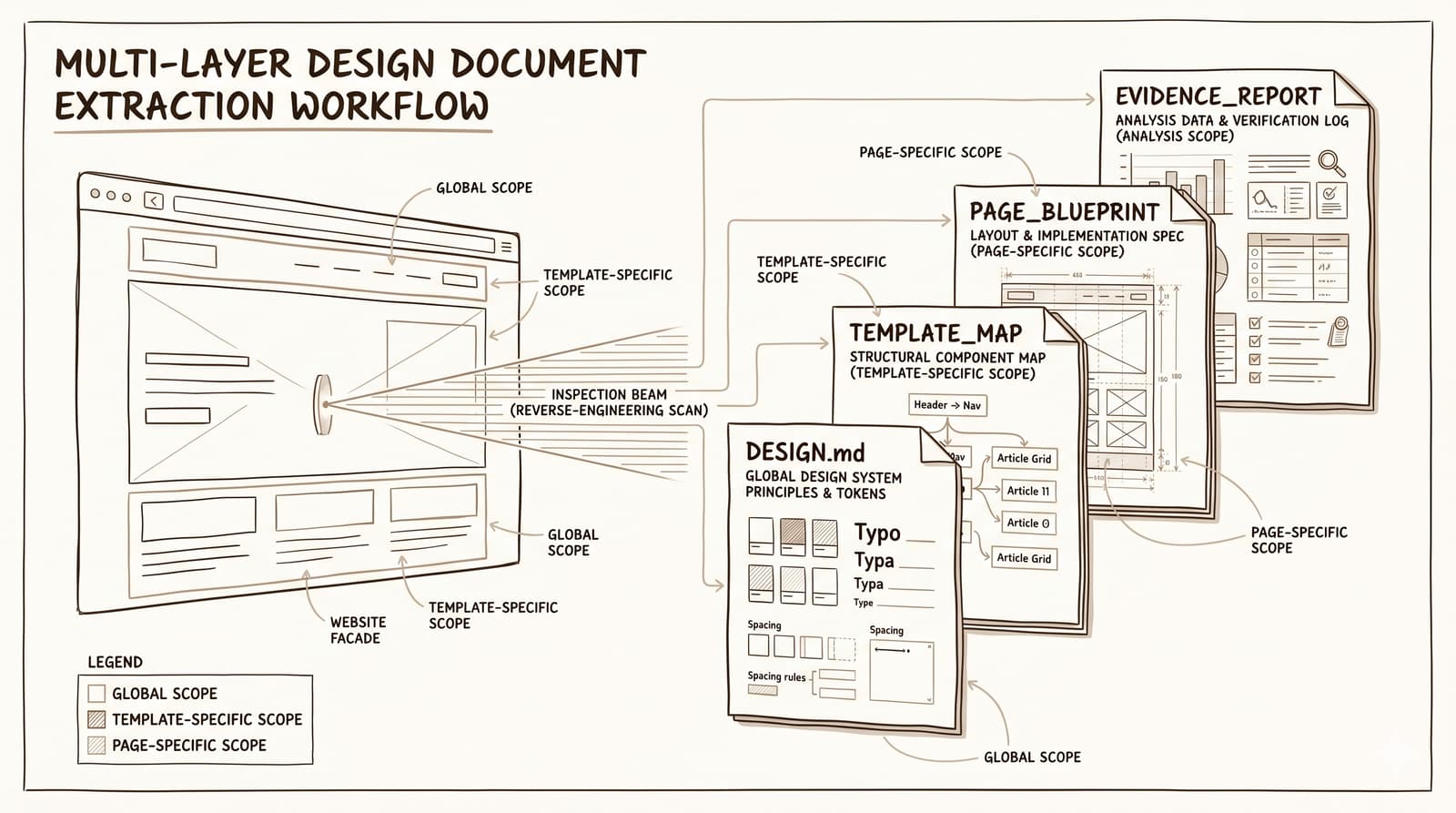
The Skill does more than take a screenshot and ask a model to guess. It performs a systematic analysis. It discovers representative page templates, uses browser inspection tools to collect computed styles and CSS tokens, separates global rules from template-specific decisions, and records both the source and confidence of each conclusion.
The result is not a vague note saying that a site “uses blue.” It is a structured reference that can guide implementation: which blue is used, where it appears, how it relates to the neutral palette, which components use it, and how confidently the evidence supports that rule.
Project repository: github.com/Scofieldfree/website-to-design
How It Differs from design.md
Both projects address the same general problem, but they take different paths:
| Dimension | design.md | website-to-design-md |
|---|---|---|
| Core form | Static reference library | Dynamic analysis tool |
| Coverage | A curated set of well-known sites | Any website the tool can inspect |
| Output | One DESIGN.md file | Layered DESIGN.md, TEMPLATE_MAP, PAGE_BLUEPRINT, and EVIDENCE_REPORT files |
| Template differences | Usually summarized together | Detects and documents page templates separately |
| Evidence trail | Generally not included | Records evidence sources and confidence levels |
| Workflow | Reference an existing document | Run the Skill first, then use the generated documents |
One way to think about the relationship is that design.md is a dictionary of notable website styles, while website-to-design-md is a scanner for producing a new entry. The two can complement each other: a document generated by the Skill can be reviewed, refined, and contributed back to a shared reference library.
How the Skill Works
The Skill supports two working modes.
Default mode: a design system overview
Give it a URL and it produces a DESIGN.md. This mode works well when you need a quick, structured view of a site's palette, typography, components, spacing, and overall character.
Recreation mode: higher-fidelity implementation guidance
When you explicitly ask to imitate or recreate the site's style, the Skill switches to a deeper mode. It produces DESIGN.md plus three additional documents:
TEMPLATE_MAP.mddescribes how page templates differ. It distinguishes site-wide rules from decisions that belong only to the homepage, a listing page, a detail page, or another template.PAGE_BLUEPRINT.mddescribes composition and rhythm. It records the order of sections, the proportions of the hero, the number of cards in a row, content density, and where the layout creates breathing room.EVIDENCE_REPORT.mdrecords how each conclusion was reached and how certain it is. A value read directly from DevTools carries different weight from a visual estimate based on a screenshot.
The internal analysis follows a repeatable sequence:
- Check available browser tools. If Chrome DevTools MCP or an equivalent inspection tool is available, the Skill uses it to inspect computed styles, CSS variables, and DOM structure. Screenshots remain useful, but they are not the only source of evidence.
- Discover representative pages. When the user supplies only the homepage, the Skill follows navigation and same-domain links to find useful internal pages.
- Build a template matrix. It classifies pages by role, such as homepage, listing, detail, and pricing. This prevents a single unusual page from defining the whole system.
- Collect evidence per template. It samples the computed styles of the body, headings, prose, buttons, cards, navigation, inputs, and other important elements. When possible, it also checks hover, focus, sticky, and related interaction states.
- Assign a scope to every finding. Each conclusion is marked as
global,template-specific,page-specific, oruncertain. Downstream agents can then apply the rule at the right level. - Write structured documents. The output follows a stable format and remains compatible with the conventions used by the design.md library.
The sequence matters. A polished design is a system of repeated choices, not a bag of isolated CSS values. By connecting each observation to a template, a component, and an evidence source, the Skill produces guidance an implementation agent can reason about.
Results: An Airbnb Example
The repository includes a complete case study based on zh.airbnb.com.
The generated DESIGN.md captures Airbnb's global visual system: a bright white canvas, warm near-black text, a deliberate radius scale from 12px through 16px, 20px, 24px, 40px, and finally 50%, plus the restrained use of coral #FF385C as an action color. It also records how Airbnb Cereal carries the type system from navigation to body copy.
The TEMPLATE_MAP.md reveals the structural differences between page types. The homepage and experiences pages use horizontal discovery rails. Search results split into a list-and-map layout. A property detail page shifts to a deeper vertical composition built around trust modules and a booking card. Even as those templates change, the palette, typography, and radius rules remain consistent.
The PAGE_BLUEPRINT.md records the rhythm of each page: how sections build on one another, how much visual weight the hero receives, where dense browsing areas appear, and where the composition slows down. These observations help an agent reproduce the pacing of a page rather than merely copying surface colors.
The EVIDENCE_REPORT.md separates facts read directly through DevTools from conclusions inferred from screenshots and flags areas where the evidence is incomplete. That distinction makes the output more useful during implementation because the agent knows which values it can apply exactly and where it should remain conservative.
The repository also contains a more revealing downstream example. A conversion prompt takes the Airbnb analysis and applies it to a completely different product: a pet service booking website. The new site inherits Airbnb's visual language—a white canvas, capsule-shaped search, image-led browsing cards, and trust modules—while replacing travel content with pet services. This shows that the extracted system is transferable rather than bound to the original business domain.
The screenshots in this example include Chinese interface text because the inspected source was Airbnb's Chinese site. The English analysis explains the layout and visual rules around those screens; the text inside an image is evidence from the source, not interface copy for the resulting product.
How to Use It
Installation
Load the skills/website-to-design-md directory into the Skill system used by your coding agent. The workflow can be used with Copilot, Claude Code, Cursor, or another agent environment that supports Skills.
Basic usage
Tell the agent: “Use website-to-design-md to analyze https://example.com.” The Skill will inspect the target and begin producing the design reference.
Getting the best result
- Provide browser inspection capabilities. If the environment includes Chrome MCP or a similar tool, the analysis becomes much more precise. The Skill prefers measured values over guesses from screenshots.
- State your intent. If you want to recreate the style, say so explicitly. The Skill will enter recreation mode and generate the complete four-document set.
- Look beyond the homepage. The Skill discovers internal pages automatically, but you can name important page types when you already know which ones matter.
Using the generated documents
# For a quick style reference
→ Read DESIGN.md

# For an implementation with multiple pages
→ Read TEMPLATE_MAP.md to understand template differences
→ Read PAGE_BLUEPRINT.md to understand page composition
→ Check EVIDENCE_REPORT.md to see which conclusions are well supported

# To transfer the style to a new product
→ Write a conversion prompt that cites all generated documents as the visual source
→ Specify the new product position, content, and page requirements
The documents are most useful when treated as a connected set. DESIGN.md supplies the stable visual language, the template map defines where that language changes, the blueprint supplies composition, and the evidence report communicates certainty.
Why the Output Is Layered
The earliest version produced one large file. In practice, combining global rules, template differences, page composition, and evidence in a single document made downstream agents confuse their scopes. A large homepage hero could be mistaken for a universal site rule. A special detail-page treatment could spread to every page. Evidence and speculation were also too easy to mix together.
The layered model solves those problems:
DESIGN.mdcontains only stable rules that repeat across the site. An agent can treat it as the project-level design baseline.TEMPLATE_MAP.mdtells the agent that certain differences are intentional and should remain different.PAGE_BLUEPRINT.mdexplains how sections should be ordered and paced, instead of leaving the agent to stack components arbitrarily.EVIDENCE_REPORT.mdshows where the implementation can be exact and where it should account for uncertainty.
Separating these responsibilities directly reduces visual drift. It also makes review easier: a designer can challenge a global token without searching through page-specific notes, while a developer can inspect the blueprint for the exact template being built.
Try It
If you use AI agents for frontend development, a dependable visual reference can save substantial design and review time. You can start in three steps:
- Star the repository: github.com/Scofieldfree/website-to-design
- Install the Skill and run it on a site you admire to see the quality and structure of the generated analysis.
- Use the documents to guide your next project and compare the result with an agent working from a short visual prompt alone.
If the analysis produces a strong design document, you can also review it and contribute it to the design.md community library. That turns one site's evidence into a reusable reference for more designers and developers.